Professional Audio and Telephone Recorder Software
Call Recording ScenariosThe VRS Recording System supports a number of different hardware setups. For a step by step guide to setting up your system to record phone calls, please see our Call Recording Scenarios page. |
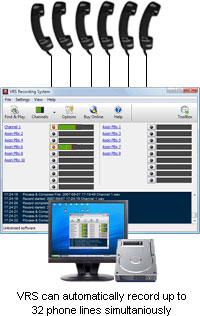
 Telephone line recording (call recording)

Voice Recording Software - System Requirements
Note: No hardware is required for recording Voice Over IP (VoIP) phone calls directly over the network (eg. calls made with Express Talk SIP Softphone).
Download VRS Audio Recording SoftwareThe software can be downloaded by clicking on one of the following links.
VRS Recording System - Purchase and RegistrationVRS must be licensed for each installation at a specified location where it will be used. To purchase a license and obtain a registration key by credit card, please use the VRS Recording System - Pricing Info and Online Purchase page.
Reseller TermsIf you wish to become a reseller of this or any other software application made by us, please see our Software Reseller Information page.Software Suggestions and Development ServicesIf you have any suggestions for improvements to VRS or suggestions for other audio software that you might need, please visit our suggestions page. Many of our software projects have been undertaken after suggestions from users like you. We also offer custom audio software development services for commercial organisations. Please visit our development page for more information.
VRS Recording System - More Information... |


Không có nhận xét nào: